

Upload one adult’s full-body photo to create a solo costume walk with a low-angle entrance, outfit reveal, playful poses and a final turn.
Ramalama Costume Walk AI From Your Photo
Make Your Outfit The Reveal
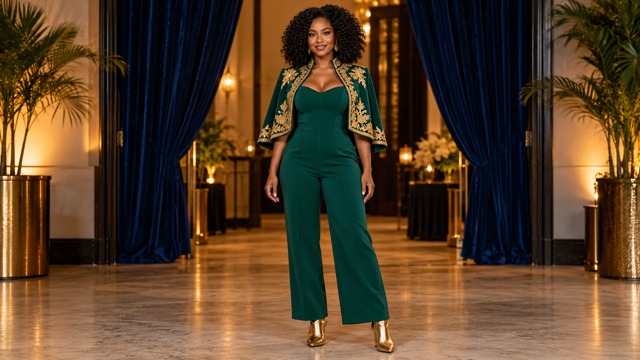
This effect turns a full-body photograph into a solo costume-walk concept built around a memorable entrance. Start with your shoes, reveal your outfit and face, then finish with expressive poses and a turn. Animate your existing look without filming yourself or writing choreography. Your photograph guides appearance; the preset guides performance. Create a costume walk from one photo, explore a Halloween costume reveal, or give an original cosplay outfit a short visual introduction. The images below are concept illustrations and prepared source photos, rather than verified generated video results. Review every finished clip before sharing it.
How To Use Ramalama Costume Walk AI
This effect keeps the process focused on your photograph and the finished performance. The video generator uses a prepared movement reference, so you do not need to upload a personal dance video. Ramalama Costume Walk AI Template sets the entrance, reveal and turn. Follow these four steps to make a costume walk from one photo while keeping your source image clear and your expectations realistic.

Choose One Full-Body Photo
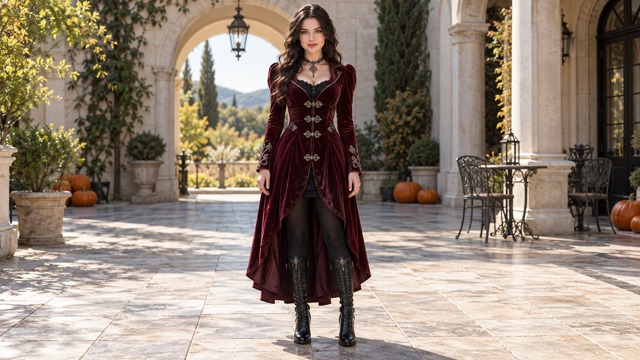
Start with one adult standing in even light. Keep the face sharp, hands visible and both shoes inside the frame. A simple pose makes clothing and proportions easier to understand. The video generator works from the appearance you provide, so wear the outfit you want represented. The walk preset is configured for one subject; avoid group photographs, cropped feet, sunglasses that obscure the eyes and objects covering the face. For an outfit reveal video, a complete head-to-shoes reference gives the strongest starting information.

Check Your Outfit And Settings
Before generating with this effect, inspect the photograph at full size. Look for visible boot shapes, clear garment edges and separation between the arms and body. The video generator applies the preset motion, while available output options depend on the selected model. The walk preset does not require a written prompt. Choose supported settings and review the displayed credit cost before submitting. Prepare a Halloween costume reveal with a readable silhouette, rather than relying on tiny accessories that may be difficult to preserve in motion.

Generate Your Walking Reveal
Submit your prepared image to this effect when the setup looks right. The reference guides a low-angle approach, an upward reveal, relaxed poses and a final turn at natural speed. The video generator is intended to turn a still look into a compact performance with a clear beginning and ending. The walk preset already contains the movement direction. To create a costume walk from one photo, you supply the subject instead of describing every step.

Review And Choose Your Result
Watch the entire clip before downloading or sharing. Check the first footsteps, face reveal, clothing continuity, hands and final turn. The video generator can introduce visual imperfections, so inspect the moving clip rather than judging one attractive frame. The walk preset aims for a coherent performance, but likeness and timing can vary. For a solo costume walk, confirm the same person and outfit remain consistent throughout. Listen to any output audio separately; this page does not promise a specific commercial soundtrack or frame-exact music synchronization.
Ramalama Costume Walk AI With A Clear Visual Story
This effect centers the reveal around the person you upload. Ramalama Costume Walk AI Template keeps those beats connected instead of asking you to plan a different action for every image. These three features explain the intended visual progression and what to check in a finished clip.
Start With Shoes And A Confident Approach
This effect begins with an unusual viewpoint: the audience meets the walking shoes and lower outfit before seeing the face. This low angle gives a solo costume walk its sense of anticipation. Ramalama Costume Walk AI Video Generator uses the reference to guide the approach and camera direction, while Ramalama Costume Walk AI Template provides the shared movement pattern. Your source photograph should show both shoes clearly, including their shape and connection to the legs. For a costume walk from one photo, simple positioning helps the intended steps read more clearly. Check the finished result for grounded feet, plausible stride length and a stable outfit before moving on to the reveal.
Reveal The Outfit And Recognizable Face
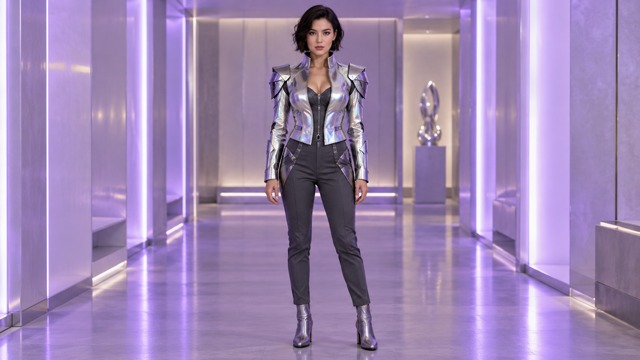
The central reveal moment is the camera rising from the legs to the complete look. An outfit reveal video needs a face that remains connected to the same body and clothing as the viewpoint changes. Ramalama Costume Walk AI Video Generator uses the uploaded adult as an appearance guide; Ramalama Costume Walk AI Template directs the reveal through the supplied motion reference. A clear, evenly lit face helps more than a heavily filtered selfie. Prepare an original cosplay look with visible fabric shapes, distinct footwear and unobstructed facial features. Inspect the transition carefully, especially around hair, sleeves, jewelry and garment edges.
Finish With Poses And A Final Turn
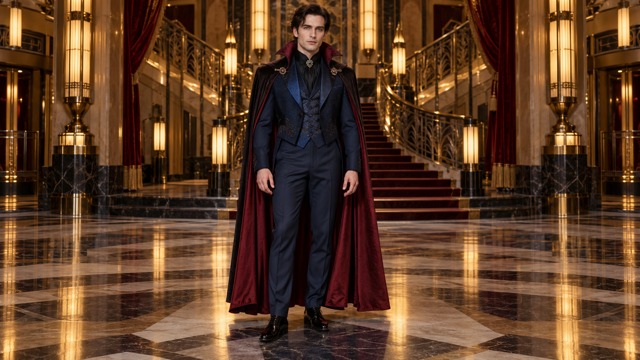
This effect gives the entrance a payoff through relaxed gestures and a closing turn. The ending helps an outfit reveal video feel complete, with a progression from partial view to full character. Ramalama Costume Walk AI Video Generator follows the motion reference at natural playback speed, and Ramalama Costume Walk AI Template keeps the finish connected to the opening. A cape, textured coat or tailored jumpsuit can offer an interesting silhouette, but moving fabric and hidden garment surfaces may vary. For a Halloween costume reveal, prioritize a coherent finish over a single dramatic still. Watch for an unchanged face, stable proportions, believable balance and clothing that continues through the rotation.
Ways To Use Ramalama Costume Walk AI
This effect can give a photographed outfit a more expressive introduction. Ramalama Costume Walk AI Video Generator is useful when a short entrance tells the story better than another static pose. The preset keeps the same solo format across different creative directions.
Halloween Costume Reveals
Build a Halloween costume reveal around a witch-inspired coat, vampire formalwear or another original adult costume. This effect lets the shoes-first entrance create anticipation before the full look appears. Ramalama Costume Walk AI Video Generator uses your photograph to guide the visible clothing, and Ramalama Costume Walk AI Template supplies the walk. Prepare a simple, full-length image with recognizable footwear and clear hands. You can create a costume walk from one photo without arranging a filming location or asking someone to operate a low camera. Review moving fabric and the face before posting.

Original Cosplay Introductions
Give an original cosplay look its own entrance. This effect suits a carefully styled outfit with an expressive silhouette and a visible face. Ramalama Costume Walk AI Video Generator can turn the still reference into a short performance concept, while Ramalama Costume Walk AI Template supplies a repeatable sequence. Keep helmets, elaborate masks and oversized props out of the way when they obscure important appearance details. For a solo costume walk, one readable character works better than several competing figures.

Personal Style And Outfit Posts
An outfit reveal video can present boots, a tailored jacket or coordinated eveningwear as part of a complete look. This effect makes the entrance the organizing idea, giving a still wardrobe photograph a new creative use. Ramalama Costume Walk AI Video Generator follows the reference camera progression; Ramalama Costume Walk AI Template supplies the same basic rhythm. Pick clothing with a distinct shape and enough contrast to read during movement. For a costume walk from one photo, everyday fashion can be just as useful as a themed costume. Review seams, patterns and accessories for changes.

Character And Event Moodboards
Use this effect to explore how a fictional adult character might make an entrance in a short event concept or visual moodboard. Ramalama Costume Walk AI Video Generator helps turn wardrobe decisions into a moving discussion point, while Ramalama Costume Walk AI Template provides a consistent performance format for separate experiments. The solo costume walk can help compare silhouette, color and overall presence, but should not be treated as proof of an actual garment or finished production. Start with your own original cosplay look, inspect the result, and decide what deserves further development.
Creative Reactions To Ramalama Costume Walk AI
These illustrative names and reactions describe possible creative uses; they are not verified customer endorsements.
Ramalama Costume Walk AI Video Generator makes the shoes-first entrance appealing. Ramalama Costume Walk AI Template gives the outfit reveal a clear visual purpose.
Ramalama Costume Walk AI Video Generator makes the shoes-first entrance appealing. Ramalama Costume Walk AI Template gives the outfit reveal a clear visual purpose.
Ramalama Costume Walk AI Video Generator feels approachable for character introductions. Ramalama Costume Walk AI Template keeps the walk and closing pose connected.
Ramalama Costume Walk AI Video Generator feels approachable for character introductions. Ramalama Costume Walk AI Template keeps the walk and closing pose connected.
Ramalama Costume Walk AI Video Generator gives familiar clothing a playful introduction. Ramalama Costume Walk AI Template makes the sequence easy to follow.
Ramalama Costume Walk AI Video Generator gives familiar clothing a playful introduction. Ramalama Costume Walk AI Template makes the sequence easy to follow.
Ramalama Costume Walk AI Video Generator is appealing for wardrobe concepts. Ramalama Costume Walk AI Template gives the final turn a sense of completion.
Ramalama Costume Walk AI Video Generator is appealing for wardrobe concepts. Ramalama Costume Walk AI Template gives the final turn a sense of completion.

Ramalama Costume Walk AI Questions Answered
Understand the photograph, preset action and result-review process before you create. Ramalama Costume Walk AI works best when the source clearly communicates the person and outfit.
Ramalama Costume Walk AI is a photo-to-video costume-walk effect built around a low-angle approach, an upward outfit and face reveal, expressive poses and a final turn. Ramalama Costume Walk AI Video Generator takes one adult photograph as the appearance reference. Ramalama Costume Walk AI Template supplies the performance direction, so you can focus on choosing a clear image. It is designed as a solo reveal; this page does not offer a multi-person choreography setup.
Choose one adult in a full-body photograph, with a sharp face, visible hands and both shoes uncropped. Ramalama Costume Walk AI uses those details to guide the character appearance. Ramalama Costume Walk AI Video Generator benefits from even lighting and clear garment edges; Ramalama Costume Walk AI Template already handles the movement. Avoid group photos, extreme camera angles and a face hidden behind a mask. An original cosplay look should remain readable from head to toe.
No written prompt or personal reference-video upload is required for the configured effect. Ramalama Costume Walk AI uses one photo and the built-in walking reference. Choose supported settings, review the cost and generate. If you want to create a costume walk from one photo, prepare the outfit and visible appearance before uploading. The fixed performance follows the reference scene, so the background in your photograph is not promised as the finished setting.
The photograph guides the face, hair, proportions, clothing and shoes, but AI-generated details can change. Ramalama Costume Walk AI cannot guarantee an exact likeness in every frame. Inspect the reveal and turn closely, especially if the outfit includes detailed patterns or flowing fabric. For an outfit reveal video, judge continuity over the entire clip. A clean source helps communicate the intended appearance, but it does not remove the need to review results.
Available length, resolution and aspect ratio depend on the model options shown in the generator. Ramalama Costume Walk AI uses a 14-second portrait movement reference, but the selected settings determine the actual requested output. Choose vertical framing when available for a social costume reveal. Audio behavior can vary; a specific commercial song and exact beat alignment are not promised. Check the displayed settings and listen to the finished result before sharing.
This page is configured for one adult photograph and one main performer. Ramalama Costume Walk AI can support a Halloween costume reveal or another solo wardrobe concept when the complete outfit appears clearly in the source image. Friends should be prepared as separate projects rather than combined in one upload. Use photographs you have permission to process, inspect the generated result, and check the current credit cost and applicable terms before submitting.
Make Your Ramalama Costume Walk AI Entrance
Choose a full-length photo that shows your face, hands and shoes, then let Ramalama Costume Walk AI build the walking reveal around your look. Ramalama Costume Walk AI Video Generator supplies the entrance and turn, while Ramalama Costume Walk AI Template keeps the process focused on one person and one performance.
