

MAGI-2 Video Generator
Give Your Short Film A Sound Of Its Own
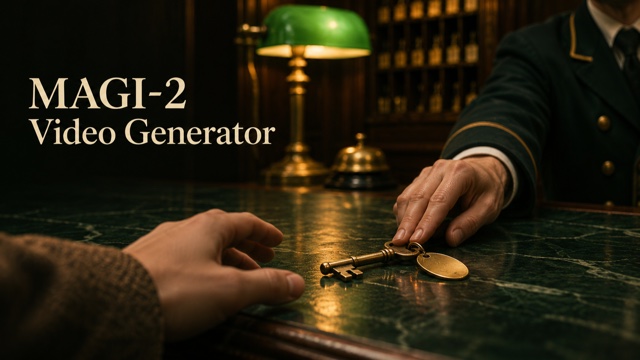
A hotel clerk slides a brass key across the counter. We hear it scrape the wood and stop beneath a guest’s hand. Start with a moment like this in the Magi 2 video generator. Where does the guest look when your Magi-2 AI sound cue stops? That glance can say more than dialogue.
Plan Your First Scene In The Magi 2 Video Generator
Describe your scene aloud before opening the Magi 2 video generator. Your pauses, gestures, and first detail suggest where to put the camera. Try it with the Magi-2 AI hotel scene.

Choose An Opening Frame
In the Magi 2 video generator, put the camera on the guest’s side of the desk, low enough to see the worn grain of the counter. Let the clerk’s sleeve enter from the left. Leave room on the right for the key to slide into view.

Give Each Reference A Job
Give the Magi 2 video generator a photograph for the lobby, a short clip for the sliding gesture, and a recording for the scrape. In your Magi-2 AI prompt, name the detail to borrow from each. Keep the green countertop from the photograph. Match the clerk’s hand speed to the clip. Let the key settle into silence.

Write The Action In Order
The clerk checks the empty staircase, slides the key, then pulls her hand back. Read your Magi 2 video generator prompt at the pace you imagine it unfolding. If the catch feels rushed, shorten the clerk’s glance. You can always give the guest’s reaction a separate Magi-2 AI shot.

Watch Once, Then Listen
Watch your first Magi 2 video generator take with the volume down. Can you tell who wants the key? Then listen with your eyes closed. The scrape should end when the guest catches it. If it continues into the next movement, revise the Magi-2 AI sound cue and keep the framing. Compare both Magi 2 video generator takes by ear.
Direct Picture And Sound
A half second of silence can change how you read a face. A low camera makes a hand movement easier to follow. Try the scene twice in the Magi 2 video generator and vary one choice at a time.

Let The Sound Arrive First
In a bicycle workshop, we hear a freewheel ticking before we see the spinning wheel. Ask the Magi 2 video generator to begin on the mechanic listening, then tilt down as the ticking slows. For a second Magi-2 AI take, keep the framing and replace the tick with the hiss of escaping air. Play both takes for someone who hasn’t read the prompt. At what point does the mechanic start to look worried?

Give A Thirty-Second Take A Turning Point
A paper boat disappears under a footbridge. A child races to the far side and waits. Spend the middle of your Magi 2 video generator take on the child searching the water. When the boat appears in the Magi-2 AI frame, hold there for a beat. Let the audience spot it first.
Frame A Detail The Viewer Can Follow
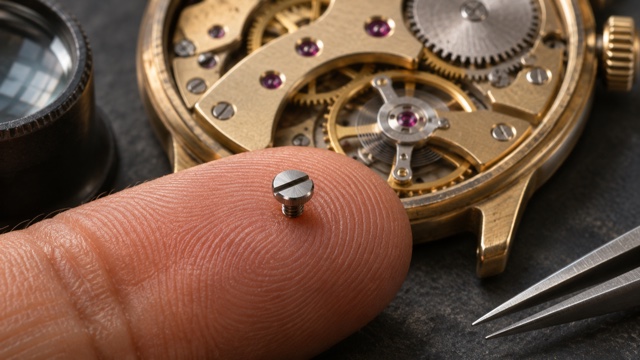
The Magi-2 AI model supports 1080p video at 25 fps. For a watchmaker at work, ask the Magi 2 video generator for a tight shot of one screw balanced on a fingertip, with the open case soft behind it. Shift focus to the watch as the screw drops into place. Try a wider Magi 2 video generator shot showing how the watchmaker steadies one hand against the other. Each angle reveals a different skill.

Combine A Place, A Movement, And A Sound
A photograph of a terracotta courtyard, a clip of wind catching laundry, and a recording of sandals on stone can describe one place together. If the clip shows a different building, tell the Magi 2 video generator it supplies the laundry’s motion. Use your Magi-2 AI prompt to follow one figure across the courtyard. As they walk under the sheets, let the footsteps tell us how close they are to the camera.
Four Scenes To Try
Pick a subject you know well. Plan your Magi 2 video generator scene around what the viewer should understand by the end of the shot. Use that to choose references and framing.

Show How A Product Works
Photograph a folding lamp closed and open on the same desk. In the Magi 2 video generator, describe a thumb releasing the catch, the arm swinging up, and a circle of light appearing on paper. Give the latch one dry click. For a second Magi-2 AI take, lower the camera to desk height so a buyer can see how much clearance the arm needs.

Block A Reunion Before Rehearsal
Use the Magi 2 video generator to try two entrances in the same hallway. In one, the returning sister appears behind her brother. In the other, he sees her reflection before he turns. Give them the same last line in both Magi-2 AI versions. Watch where the actor has room to pause before speaking. Try that entrance with both actors at rehearsal.

Teach A Hands-On Skill
Show a learner how to center a lump of clay. Give the Magi 2 video generator a side view of the wheel and a close reference of the potter’s braced elbows. Ask for one continuous press while the wheel turns. Check the Magi-2 AI clip against a real demonstration, especially the placement of the thumbs. Hold on the centered clay so beginners recognize the result.

Cut A Band Teaser To The Beat
Start on an empty stool, let a drummer settle onto it, and cut as the sticks meet. A short rhythm reference and a still of the venue can guide the Magi 2 video generator. Try one Magi-2 AI version with the room lights already on and another where they flare on the downbeat. Play both against the track and see which cut you feel in time.
Six Magi 2 Video Generator Prompts To Try
These six Magi-2 AI briefs each describe an opening frame, an action, and something to listen for. Paste one into the Magi 2 video generator as written, or swap the setting for a place you know.

The Last Cup
A barista sets two cups upside down at closing time. A knock at the window makes her turn one upright again. Ask the Magi 2 video generator to stay close enough to see her thumb hesitate on the handle. Keep the visitor outside the frame. Let a second, softer knock break the silence as she reaches for the coffee pot.



Questions About The Magi 2 Video Generator
A few practical details to help you plan a Magi 2 video generator shot and decide what to change after the first pass.
The Magi-2 AI model supports clips up to 30 seconds. A single gesture often needs much less. For someone opening an envelope, give the Magi 2 video generator time for the flap to tear, the letter to unfold, and the reader to take in the first line. End on the reaction if that is where your story lands.
The Magi-2 AI model supports 1080p at 25 fps with sound. If you’ll crop your Magi 2 video generator clip, leave a little room around the subject. For a quick gesture such as a coin changing hands, keep both hands in frame and hold briefly on the recipient’s palm so the exchange reads clearly.
Use up to 20 references in total, with up to 10 images, five video clips, and five audio clips. Start your Magi 2 video generator brief with the smallest set that explains the shot. If two photos disagree about a coat’s color, choose the one you want the viewer to recognize. Add a Magi-2 AI motion reference when it answers a different question, such as how the coat moves in the wind.
Yes. Open the Magi 2 video generator and describe a subject, a visible change, and an ending. Try a baker pressing a thumb into risen dough and watching the dent slowly spring back. After your first Magi-2 AI pass, decide whether a close photograph of the dough would help show the texture you meant.
Speak the line aloud with any hesitation you want to hear. Tell the Magi 2 video generator who speaks and give the listener something to do. For a quiet greeting, try having the listener fold a letter before answering. In a second Magi-2 AI take, keep the words and move that pause to the end of the reply. Listen for how the meaning shifts.
Find the first instant when you lose track of the subject. If a passing car draws attention away from someone reading a letter, ask the Magi 2 video generator for a quieter background. If you can’t read the expression, move closer. Keep the other directions in the Magi-2 AI prompt so you can tell whether the next take solves the problem.
What Happens In Your First Shot?
Choose one movement and one sound. Write the opening frame, generate a take in the Magi 2 video generator, and play it back with your eyes closed. What action can you hear?