

Gemini Omni Video Generator: Bring Your Ideas Into Motion
Create short videos from written ideas or guide a scene between two reference frames with Gemini Omni AI Video Generator.
Turn an idea into motion without filming. Gemini Omni Video Generator helps you describe characters, actions, lighting, and camera movement, then generate a video you can preview and refine. Start with text or two reference images. Choose your settings and create. Searching for Gemini Omni AI Video Generator Free? Check credits first. Gemini Omni follows your creative direction.
How to Use Gemini Omni Video Generator in Three Steps
Go from a rough concept to a shareable short clip through a clear workflow. Gemini Omni AI Video Generator brings mode selection, prompts, creation settings, and the Generate Video action together so you can concentrate on the scene you want to make. Use Gemini Omni to test one clear scene at a time.

Choose Your Video Creation Mode
Open Gemini Omni AI Video Generator and select Text to Video to begin with a written idea, or switch to First / Last Frame if you have images for the beginning and end of a scene. Choose the available model from the selector, including Gemini Omni Flash 1.1 where offered. This first decision determines whether you guide the clip with words alone or with visual endpoints as well.

Add Your Prompt and Set the Scene
For text generation, describe the subject, setting, action, visual style, and desired camera movement. For First / Last Frame, upload your opening and ending images and explain the motion connecting them. In Gemini Omni Video Generator, choose an available duration, aspect ratio, and resolution. The interface also displays a seed field for repeatable experimentation and the credits required for your selection. Keep instructions focused on one clear scene.

Generate, Review, and Download
Click Generate Video and let Gemini Omni Video Generator create your clip. Review the result for recognizable subjects, continuous movement, and a convincing transition if you supplied frames. If the action looks rushed or the scene drifts from your intention, adjust the prompt or reference images and generate another version. Download the result when it fits your project. Gemini Omni AI Video Generator makes this a practical create-review-adjust workflow rather than a one-shot guess.
What Can You Create with Gemini Omni Video Generator?
Gemini Omni supports two distinct starting points on this page: build a scene from a text prompt or guide movement with first and last frames. Both help turn a visual intention into a short video you can review and revise. Gemini Omni AI Video Generator gives each concept a starting point for revision.
Turn a Written Idea Into a Moving Scene
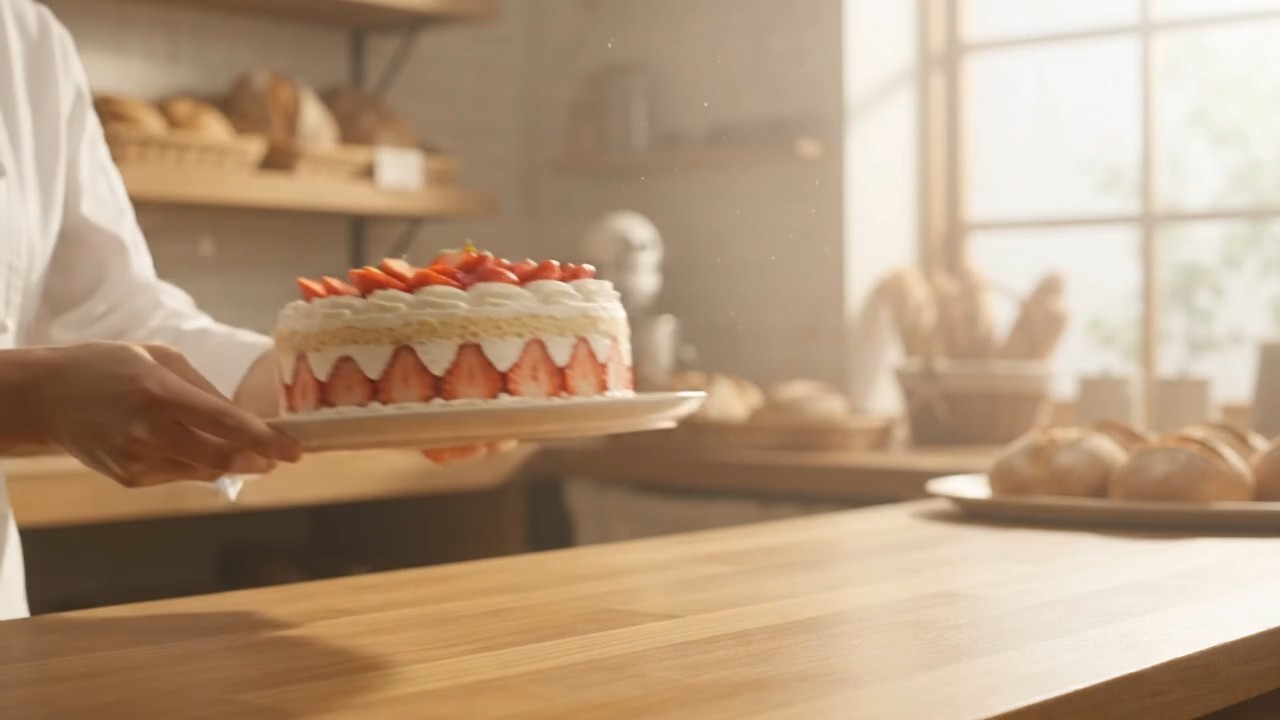
A sentence can establish the scene; a stronger prompt makes its movement easier to direct. Tell Gemini Omni AI Video Generator who or what appears, what changes during the clip, and how the camera observes the action. For example, describe a baker placing a finished cake on a sunlit counter while the camera slowly moves closer. A clear subject and one main action help the result feel purposeful. Gemini Omni Video Generator gives creators a starting point for social posts, story concepts, visual pitches, or background footage without first collecting photographs. Use Gemini Omni AI Video Generator when the scene exists in your imagination but you do not have an opening image. Revise the wording to test different actions, pacing, or atmosphere without rebuilding the concept from scratch.

Connect an Opening Frame to an Ending Frame
Sometimes you know how a video should begin and end but need help with everything in between. First / Last Frame mode lets you supply two visual endpoints and describe the transition. Gemini Omni Video Generator can use those references to guide a movement, reveal, or change of composition across the clip. Start with a closed gift box and finish with an open box showing the item inside; then request a smooth lid-opening motion. This gives an existing idea a more specific visual direction than text alone. For Gemini Omni Online projects that need consistency between the first and final moments, matching lighting, subject placement, and perspective across the references can make the intended transition easier to communicate. The result still deserves a review before publication.

Direct the Action, Not Just the Appearance
A useful video prompt says more than “cinematic” or “realistic.” Specify whether a person turns, a curtain moves in a breeze, or a camera tracks an object from left to right. Gemini Omni Video Generator responds to scene instructions, so you can explore different interpretations of the same concept through deliberate prompt changes. If the subject moves too quickly, describe a slower action; if the framing feels busy, ask for one continuous shot with a stable background. Gemini Omni AI Video Generator is especially useful for creators who need a clear visual beat rather than an unrelated collection of effects. Treat each result as a draft: observe what happened, change one important instruction, and compare the next clip with your goal.
Gemini Omni Video Generator for Everyday Creative Work
From a fast social concept to a visual pitch, Gemini Omni helps creators turn a specific idea into motion. Use the examples below to choose a scene with a clear purpose rather than generating movement for its own sake. Gemini Omni works particularly well when you identify one action to communicate.

Social Media Clips with a Clear Visual Hook
A short clip often needs one memorable action in its first moments. Use Gemini Omni Video Generator to show a flower unfolding, a room changing with the seasons, or a product arriving on a tabletop. Write the action as a simple sequence rather than listing unrelated effects. Gemini Omni AI Video Generator can help you develop a visual hook for a reel, short post, or channel intro while keeping the concept under your control. The short-clip format is useful when you want to test how a single idea reads on screen before investing in a longer production. With Gemini Omni Online, you can revisit the prompt after seeing whether the action makes sense without explanatory text. People searching for Gemini Omni AI Video Generator Free can review the required credits before creating.

Product Concepts and Visual Demonstrations
Show the feeling of a product concept before arranging a full shoot. With Gemini Omni Video Generator, describe a ceramic mug rotating on a kitchen shelf, a notebook opening on a desk, or a packaged item being revealed. If you already have an opening and a closing product image, First / Last Frame mode offers a way to describe the reveal between them. Keep logos, written labels, and product details under review: generated footage may not reproduce every fine detail exactly. Gemini Omni Video Generator is a useful concepting step for pitches, mood boards, and early marketing drafts, not a substitute for checking factual product claims or final visual accuracy.
Storyboards and Character Moments
Writers and directors often need a moving example to communicate a moment that is hard to describe on paper. Gemini Omni AI Video Generator can visualize a character hesitating at a doorway, a paper airplane crossing a classroom, or a camera following footsteps through a corridor. Focus each generation on one beat of the story. For a more defined beginning and ending, use two frame references that show the desired shift. Gemini Omni AI Video Generator can turn a written scene into something collaborators can discuss: Does the timing feel right? Is the point of view clear? Does the movement support the emotion? Those answers can guide the next storyboard revision.

Experiments with Transitions and Motion
You do not always need a complete narrative to make a useful video. Use Gemini Omni Video Generator to explore how one scene might transform into another, how an object could enter a frame, or how a still composition might acquire natural motion. Gemini Omni Video Generator gives you room to test alternatives while keeping the same underlying idea. Try one prompt with a gentle camera push and another with a fixed viewpoint, then compare which communicates the subject better. For Gemini Omni Online experiments, choose references with a compatible subject and setting when continuity matters. Keep the strongest result as a reference for future editing, presentation, or production planning.
Creative Workflows People Can Explore with Gemini Omni
These illustrative creator scenarios show ways to use Gemini Omni AI Video Generator for planning, prototyping, and comparing visual ideas. Replace these examples with verified customer feedback before publication. Gemini Omni results should be reviewed for accuracy before sharing.
I wanted to show a small product reveal without filming a prototype. With Gemini Omni Video Generator, I started from two reference images and wrote a short instruction for the lid movement. The first version helped me spot a framing issue, so I adjusted the references and tried again. Seeing the transition in motion was much more helpful for our planning conversation than another static mockup. Gemini Omni Video Generator gave us a quick way to discuss the visual idea before a shoot.
I wanted to show a small product reveal without filming a prototype. With Gemini Omni Video Generator, I started from two reference images and wrote a short instruction for the lid movement. The first version helped me spot a framing issue, so I adjusted the references and tried again. Seeing the transition in motion was much more helpful for our planning conversation than another static mockup. Gemini Omni Video Generator gave us a quick way to discuss the visual idea before a shoot.
I use short video concepts to plan posts, but I do not always have suitable footage. Gemini Omni AI Video Generator let me describe an everyday scene and test whether the action was clear enough for a quick clip. I liked being able to change the pace in my prompt rather than starting with an entirely different idea. The result was a useful draft for deciding what to make next, not something I had to treat as final immediately.
I use short video concepts to plan posts, but I do not always have suitable footage. Gemini Omni AI Video Generator let me describe an everyday scene and test whether the action was clear enough for a quick clip. I liked being able to change the pace in my prompt rather than starting with an entirely different idea. The result was a useful draft for deciding what to make next, not something I had to treat as final immediately.
For a story pitch, I needed a character to move from a quiet opening image toward a very specific ending composition. First / Last Frame mode in Gemini Omni Video Generator helped me explore the connecting action. I still checked the result for details that changed unexpectedly, but the moving example made my direction easier to explain. Gemini Omni Video Generator turned a pair of references into a conversation about timing and camera placement.
For a story pitch, I needed a character to move from a quiet opening image toward a very specific ending composition. First / Last Frame mode in Gemini Omni Video Generator helped me explore the connecting action. I still checked the result for details that changed unexpectedly, but the moving example made my direction easier to explain. Gemini Omni Video Generator turned a pair of references into a conversation about timing and camera placement.
I was curious whether a simple scene would work better with camera movement or a still frame. I generated one Gemini Omni version with a gentle push-in and another with a stable shot. Comparing them helped me choose a visual approach instead of guessing from the script. Gemini Omni Video Generator was useful for experimenting with one decision at a time while keeping the subject and setting familiar.
I was curious whether a simple scene would work better with camera movement or a still frame. I generated one Gemini Omni version with a gentle push-in and another with a stable shot. Comparing them helped me choose a visual approach instead of guessing from the script. Gemini Omni Video Generator was useful for experimenting with one decision at a time while keeping the subject and setting familiar.




Gemini Omni Video Generator FAQs
Quick answers about Gemini Omni modes, prompts, duration, model selection, and the controls visible in the generator. Gemini Omni options may vary with the selected model.
Gemini Omni AI Video Generator creates short clips from a written prompt or, in First / Last Frame mode, from two reference images and motion instructions. Select a mode, set the available options, then generate and review the video.
Text to Video starts from your description. First / Last Frame uses opening and ending images to guide how the scene changes between them. Choose the mode that matches the material you already have.
Describe the subject, setting, main action, camera movement, and mood. Gemini Omni AI Video Generator works best when the instruction focuses on one understandable scene rather than several competing events.
The interface shows 4, 6, 8, and 10-second options. Availability can vary by selected model or generation mode, so check the choices shown before creating your clip.
The model selector shows Gemini Omni and Gemini Omni Flash 1.1. Choose an available option for your project; the settings and output you can request may differ between them.
Gemini Omni Online displays the credits required before you select Generate Video. Review that amount along with your chosen mode and settings before starting another generation. If you searched for Gemini Omni AI Video Generator Free, check the displayed credits rather than assuming every generation is complimentary.
Make Your Next Scene with Gemini Omni
Describe a moment, or guide its beginning and ending with two images. Gemini Omni AI Video Generator brings the prompt and creation controls into one workflow so you can generate a short clip, inspect its movement, and improve the next version. Open Gemini Omni Online and turn a clear visual idea into a video worth sharing. If you arrived via Gemini Omni AI Video Generator Free, review the listed credits before generating. Gemini Omni AI Video Generator is ready for your next visual experiment.
