

Upload one clear portrait, pick a halo, horns, or a tie, and create a playful reveal. No prompt to write.
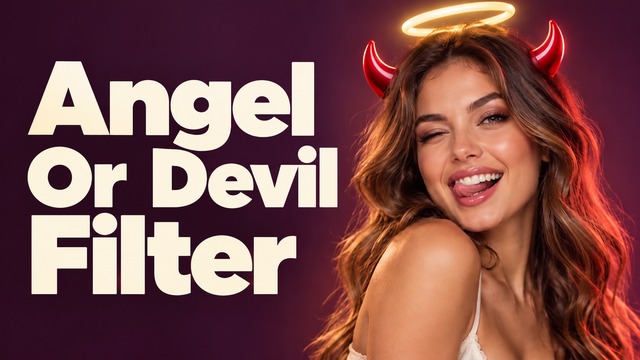
Angel Or Devil Filter: Turn Your Selfie Into A Reveal
One Photo, A Racing Meter, And A Playful Ending
Angel Or Devil Filter turns one clear portrait into a playful reveal with a racing meter, expressive reactions, and a halo or cartoon horns. Start with your own photo, pick an ending, and generate without writing instructions. This angel and devil filter builds its joke around anticipation: you look innocent while the graphics suggest another story. Looking for an angel or demon filter with a familiar face? Make a halo or horns video for friends, a seasonal post, or a lighthearted reaction. The artwork here illustrates the concept; generated motion, facial details, and numbers can vary.

How To Use Angel Or Devil Filter
Learning how to use angel or devil filter starts with the photo, not a complicated edit. Angel Or Devil Filter combines one uploaded portrait with a selected ending and the effect's built-in scene direction. Follow these four steps to create angel or devil filter from a photo. Treat each result as a creative interpretation, then review it before sharing.

Upload One Clear Portrait
Choose a well-lit, chest-up photo of one adult facing the camera. Angel Or Devil Filter needs a visible face, clear hair, and enough empty space above the head for the meter. Skip dark glasses, hats, heavy beauty effects, and hands covering the eyes. To make angel or devil filter from a photo, use a normal starting image without an existing halo or horns. This angel and devil filter benefits from a simple background.

Pick Your Ending
Choose Angel Wins for a golden halo, Devil Wins for small red horns, or Perfect Tie for an undecided finish. Angel Or Devil Filter uses this preset to direct the reveal; it does not evaluate your character. With this angel or demon filter, the joke is a staged result and your animated reaction. For angel or devil filter for TikTok, a clear final beat makes the idea easier to understand on a small screen.

Generate Your Reveal
Check the available video settings and displayed generation cost, then start. Angel Or Devil Filter applies the built-in instructions, so there is no prompt to compose. This angel and devil filter aims for a continuous portrait scene: the meter builds suspense, then the chosen reveal lands. Duration, resolution, processing time, and credits depend on the settings shown in the generator. This angel or demon filter needs only the source and preset.

Review And Share The Moment
Play Angel Or Devil Filter from beginning to end. Check that the face stays coherent, the symbols are clear, and the ending matches your chosen preset. AI-drawn percentages can vary, so inspect digits rather than treating them as accurate measurements. This angel or demon filter is most effective when the final expression has room to breathe. For a halo or horns video, keep the reveal visible instead of covering it with stickers.
Build Suspense With Angel Or Devil Filter
Angel Or Devil Filter follows a simple visual story: a recognizable portrait, a playful contest, and an expressive payoff. This angel and devil filter uses a familiar good-versus-mischievous visual language without requiring a costume shoot. Think of this angel or demon filter as a small performance for your photo, not a personality score. The following still images are AI-made concept illustrations of the scene, rather than verified frames from completed videos.
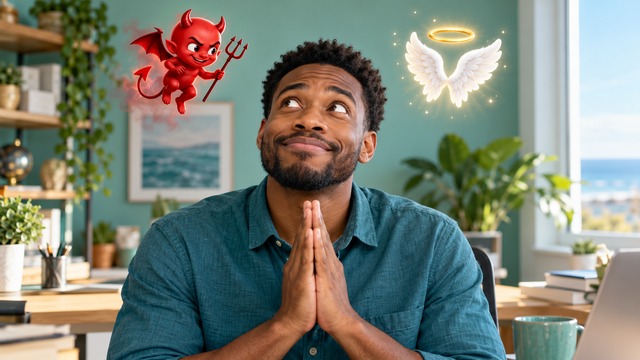
Angel Or Devil Filter With A Racing Meter
Angel Or Devil Filter places the contest above the head so the face remains the focus. A devil emblem and angel wings establish the two sides while the percentages rise. This angel or demon filter builds suspense through your reaction: a glance upward, an uncertain smile, or a brief moment of mock surprise. This angel and devil filter is easier to read when the background is quiet and the head has space around it. If you want angel or devil filter for TikTok, keep important details away from the edges that captions may cover. A balanced crop helps this angel and devil filter communicate the joke immediately. This angel and devil filter is decorative entertainment; AI can draw inconsistent digits, and a rerun may change details. Review the whole sequence before posting, especially if the exact percentages matter to the caption.

Angel Or Devil Filter With A Golden Halo
Choose Angel Wins and Angel Or Devil Filter directs the final beat toward a luminous golden ring above your hair. A warmer, brighter mood and a delighted reaction make the result feel cheerful. This angel or demon filter keeps the accessory small enough to leave your face visible. This angel and devil filter does not need giant wings, a different costume, or a new location to tell the story. Create angel or devil filter from a photo with an everyday expression for a clear contrast between anticipation and relief. This angel or demon filter can turn an ordinary portrait into a friendly punchline for a birthday message or a personal story. For a halo or horns video with a positive finish, choose a caption that matches the bright reveal.

Angel Or Devil Filter With Playful Red Horns
Choose Devil Wins and Angel Or Devil Filter directs a cheekier ending with tiny red cartoon horns and warm red lighting. This angel or demon filter aims for a mischievous grin, not a frightening transformation. This angel and devil filter aims to retain natural eyes, recognizable facial features, and the mood of your source photo. This angel or demon filter is designed around harmless theatrical contrast, with no gore or horror styling in the built-in direction. If you are learning how to use angel or devil filter, compare the same portrait across presets to see how the ending changes the story.
Ideas For Angel Or Devil Filter
Angel Or Devil Filter fits personal posts that benefit from a quick question and a visible answer. Use this angel and devil filter to invite a friendly reaction, build a seasonal joke, or compare contrasting endings. This angel or demon filter keeps the setup simple so the caption can supply the context.

TikTok Reaction Posts
Create angel or devil filter for TikTok and let friends guess the outcome before the reveal. Angel Or Devil Filter gives the clip a beginning and an ending, so keep the setup short when you add your own caption. This angel and devil filter pairs well with a playful question about your most innocent-looking photo. Check the platform crop before sharing so the floating meter stays visible.

Friendly Group-Chat Jokes
Make angel or devil filter from a photo that your friends already recognize. Angel Or Devil Filter adds a new punchline to an ordinary portrait without asking you to record a performance. This angel or demon filter can be a lighthearted reply to a running joke, provided everyone is comfortable with the image being used.

Halloween Without A Costume Shoot
Use Angel Or Devil Filter for a seasonal post with an everyday selfie. A halo or horns video suggests a character through a simple accessory and a change of mood. This angel and devil filter can complement a Halloween caption without needing frightening imagery or elaborate makeup. This angel or demon filter is especially clear when the original hair and clothing remain easy to recognize.

Two-Part Personality Stories
Generate contrasting endings from the same portrait and share them as separate story slides. Angel Or Devil Filter lets the chosen preset change the joke while the starting photo stays familiar. This angel and devil filter suits a sweet first impression followed by a cheeky second post. When planning angel or devil filter for TikTok or Reels, review each clip independently and use consistent captions so viewers understand the connection.
Creative Reactions To Angel Or Devil Filter
The following names and reactions are illustrative creative scenarios, not verified customer endorsements. They show different ways to evaluate this angel and devil filter: a readable setup, a recognizable portrait, and an ending that fits the joke.
Angel Or Devil Filter gives my everyday selfie a cheerful punchline. The anticipation makes a simple halo reveal feel playful.
Angel Or Devil Filter gives my everyday selfie a cheerful punchline. The anticipation makes a simple halo reveal feel playful.
I like choosing the ending first. This angel and devil filter makes a friendly joke easy to plan.
I like choosing the ending first. This angel and devil filter makes a friendly joke easy to plan.
Angel Or Devil Filter feels approachable: one clear portrait, one ending, and a lighthearted reaction to share.
Angel Or Devil Filter feels approachable: one clear portrait, one ending, and a lighthearted reaction to share.
I enjoy Angel Or Devil Filter as an angel or demon filter concept with a clear setup and payoff.
I enjoy Angel Or Devil Filter as an angel or demon filter concept with a clear setup and payoff.


Angel Or Devil Filter Questions
Find practical answers about the photo, preset endings, and what to check in a completed clip. Angel Or Devil Filter is a creative effect with variable AI results. Use this guide to prepare a stronger source and understand the experience before generating.
Angel Or Devil Filter is a photo-to-video effect that stages a playful contest between angel and devil graphics above your head. This angel and devil filter builds toward a halo, cartoon horns, or a tie, depending on your selected ending. People also describe the idea as an angel or demon filter or an angel and devil filter. It is an entertainment format, not a real assessment of personality, morality, or appearance. This angel or demon filter uses a fixed effect direction with selectable endings, so you do not need to write a custom scene.
To create angel or devil filter from a photo, upload one clear adult portrait, choose the ending, review the available settings and cost, then generate. Angel Or Devil Filter works from the photo you supply, so a neutral, well-lit source is a better starting point than an image already covered in special effects. This is also how to use angel or devil filter without preparing an edited video or writing instructions.
Yes. Angel Or Devil Filter includes Angel Wins, Devil Wins, and Perfect Tie presets. Angel Wins requests the golden ring, Devil Wins requests small red horns, and Perfect Tie requests an undecided reaction without either accessory on the head. This angel and devil filter follows the chosen creative direction rather than calculating your true character. If you want a halo or horns video with a particular tone, select the appropriate preset before generating and review the finish afterward.
No. Angel Or Devil Filter uses built-in effect instructions and a preset selector. Upload the photo and choose an ending; there is no need to describe camera moves or compose a transformation prompt. This angel or demon filter is intended for a simple source-to-result workflow. This angel or demon filter uses prepared timing guidance.
You can prepare angel or devil filter for TikTok, Reels, or Shorts and use the available download option after generation. Check the selected aspect ratio and each platform's crop, because the meter sits above your head. Angel Or Devil Filter creates the visual scene; add any platform-specific captions or music afterward as needed. This angel and devil filter does not guarantee views, engagement, or an exact match to another creator's post. Keep this angel and devil filter easy to read on mobile.
Angel Or Devil Filter asks a generative video model to draw moving symbols, digits, and a reaction across frames. That can produce uneven percentages, small changes in facial details, or accessories that need another attempt. This angel or demon filter works best with clear lighting and unobstructed hair, but no source guarantees a perfect result. Costs and video settings are shown in the generator; this page does not promise free, unlimited, or instant rendering. Treat this angel or demon filter as a creative interpretation.
Create Your Angel Or Devil Filter Reveal
Start with a clear portrait and let Angel Or Devil Filter turn anticipation into a playful ending. Pick a halo, small red horns, or a Perfect Tie, then review the generated clip before sharing. This angel and devil filter keeps the creative setup simple while leaving room for your own caption and sense of humor. Use this angel or demon filter to make a familiar photo part of a new conversation. Your next reaction post starts with one picture.
